How to edit text in a PDF and keep the same font
A typo in a contract, an old address on your letterhead, last year's price in your own brochure: you should be able to click the words and type. Here is how to do exactly that on Windows, with the new text in the PDF's own font, size and colour.
Why the font changes when you edit a PDF
A PDF is not a word-processing document. It is a set of instructions that places each word, sometimes each letter, at an exact spot on the page. And to stay small, a PDF usually carries only the letters it actually uses from each font. Type a new letter and many editors cannot draw it, so they quietly set the line in another font. That is why edited PDFs often look "patched".
Direct PDF Editor works the other way round: it reads the line you click (font, size, colour, letter spacing and baseline) and writes your new words back just like the words around them. When the PDF lacks a letter, it uses the same font installed in Windows.
Edit PDF text without Acrobat
You do not need Adobe Acrobat or a subscription to change the words in a PDF. Direct PDF Editor is a small Windows app that edits the PDF's own text on your computer, for $4.99 once, with a free trial to check your file first.
Step by step
1. Open the PDF
Download Direct PDF Editor (free trial, 7 MB) and open your PDF: drop it on the window, press Ctrl+O, or right-click the file and choose Open with › Direct PDF Editor.
2. Click the line you want to change
With Edit text selected (it is on by default), click a line. To change only a few words, or several lines at once, drag a box across them. The text opens in an editing box that already uses the line's own font, size and colour.
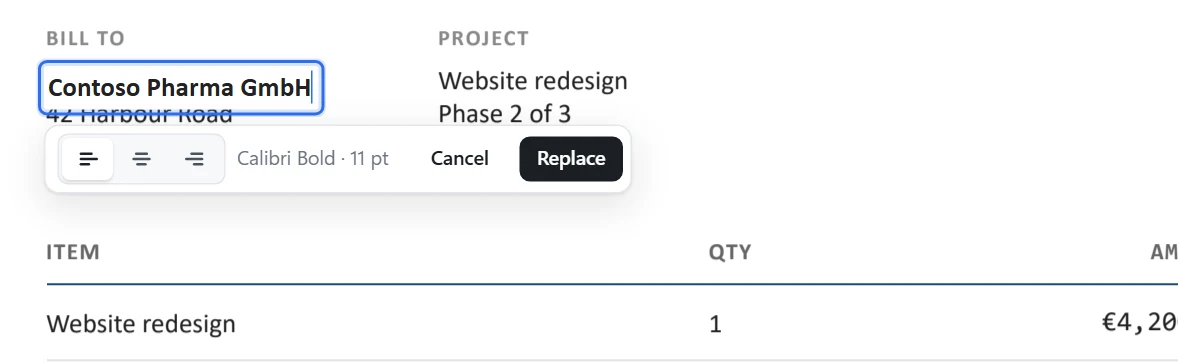
3. Type, then press Enter
Type your correction and press Enter (or click Replace). Press Shift+Enter to add a line below, or empty a line to remove it. Esc cancels.
- Numbers in a column? Amounts keep their right edge automatically, so
€4,200.00can become€14,200.00without breaking the column. The three alignment buttons let you choose left, middle or right yourself. - Words that follow on the same line move along when your text gets longer or shorter; text in the next column stays where it is.
4. Save
Press Ctrl+S. Your original PDF stays as it was; the edited copy is saved beside it as "name (edited).pdf". Use Save as to choose another name or to replace the original.
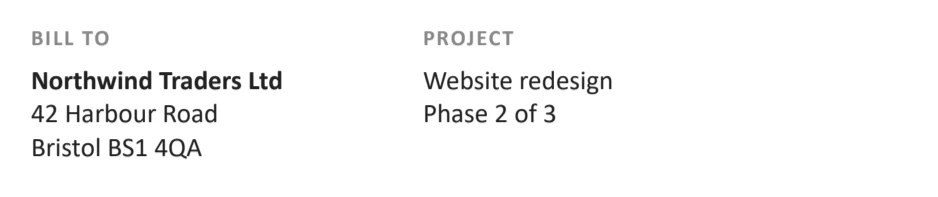
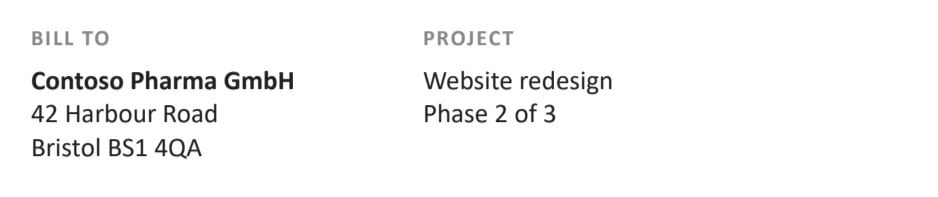
Useful to know
- Undo any change with Ctrl+Z, as many as the last 30.
- The new text is real text: it can be searched, copied and edited again later.
- Scanned pages work too. If the words are part of a picture, the app reads them with Windows' text recognition. See how to edit a scanned PDF.
- Need to add new words somewhere without replacing any? Use Add text (T), click the spot and type.
- Everything stays on your computer. Nothing is uploaded, so it is safe for contracts, payslips and IDs.
Questions
Why does the font change when I edit a PDF in other editors?
A PDF usually carries only the letters it uses from each font (a "subset"). If you type a letter that is not in that subset, most editors swap the whole line to a font they have. Direct PDF Editor keeps the PDF's own font where it can, and otherwise uses the very same font from Windows, so the line looks unchanged.
Can I edit text in a PDF without Adobe Acrobat?
Yes. Direct PDF Editor edits the text of any PDF on Windows 10 and 11 without Acrobat, without an account and without uploading the file. It costs $4.99 once, and you can try it free first.
Will editing change anything else on the page?
No. Only the words you change are touched. The app draws the page before and after every change and, if anything else would move or change colour, it makes the change another way so the rest of the page stays exactly as it was.
Can I edit a PDF for free?
The free trial of Direct PDF Editor does every edit. Saved PDFs carry a small line at the foot of each page until you unlock the app for $4.99.
Edit your PDF now
Free to try, $4.99 once to keep. No subscription, no account, no uploads.