The offline PDF editor for Windows that edits text in the same font
Click any line in a PDF and type. Direct PDF Editor puts your words back in the PDF's own font, size and colour, even in scans. Sign, highlight and sort pages too. Your files never leave your computer.
Launch price $4.99, then $19.99. Ends in 31 October 2026
- No subscription
- No uploads, no account
- Lifetime updates & support
Change the words. Keep the look.
Most PDF editors swap your text into a different font, so the change sticks out. Direct PDF Editor reads the line you click (its font, size, colour, spacing and baseline) and writes your new text back exactly like the words around it.
- Real text, not a picture. The new words can be searched, copied and edited again.
- Figures stay in their columns. Amounts keep their right edge when they get longer.
- The rest of the page is untouched. Every change is checked against the page before it is kept.
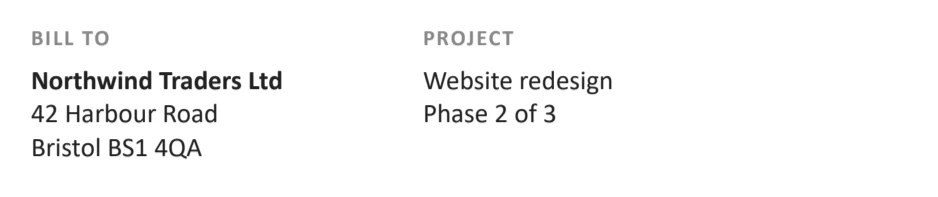
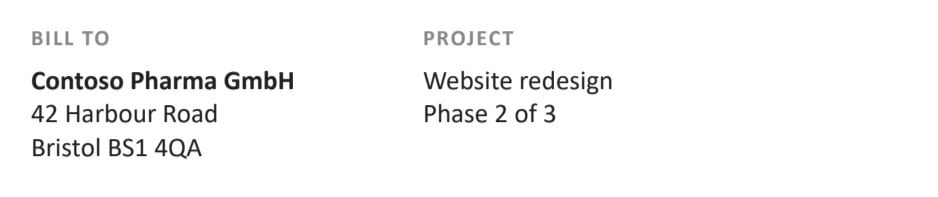
Even text in a scan is editable
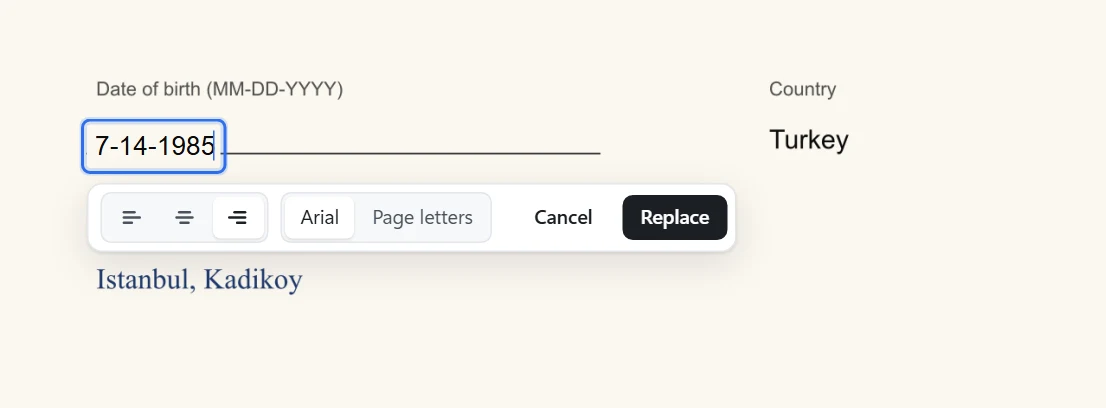
Signed forms, old letters, photos of documents: text that is only pixels is read by Windows' built-in text recognition, right on your PC. Click a word, type the correction, and choose how it looks:
- The closest font on your computer, matched to the scan's letters, size and ink colour.
- Page letters: new words built from letters cut out of the page itself, so they blend into the scan.
A complete PDF editor for $4.99
The everyday jobs people pay monthly subscriptions for, in one small app that opens instantly.
Edit existing text
Click a line or drag across words and type. Same font, size and colour.
Add text anywhere
Fill in flat forms, add notes or dates. Pick the font, size, colour, bold and italic.
Sign PDFs
Draw your signature or type it in a handwriting font, then drop it where it goes.
Highlight & white-out
Mark what matters, cover what should not show, draw boxes around anything.
Add pictures & logos
Place a photo, stamp or logo, then move and resize it on the page.
Merge & sort pages
Drag pages into order, rotate, delete, add blank pages or all the pages of another PDF.
Pictures to PDF
Turn scans and phone photos into one tidy PDF, a picture per page.
Export text & images
Save a PDF's text as a .txt file (scans too) or its pages as PNG or JPG pictures.
Locked PDFs
Open password-protected PDFs with their password and save an editable copy.
Your PDFs never leave your computer
Free online PDF editors ask you to upload contracts, invoices, IDs and medical forms to someone else's server. Direct PDF Editor does all the work on your own PC, with the same PDF engine that is built into Chrome, so there is nothing to upload and nothing to leak.
- No account, no sign-in, no cloud storage.
- Works on a plane, in the field, behind a strict firewall.
- Opens instantly: no uploads to wait for, no file-size limits.
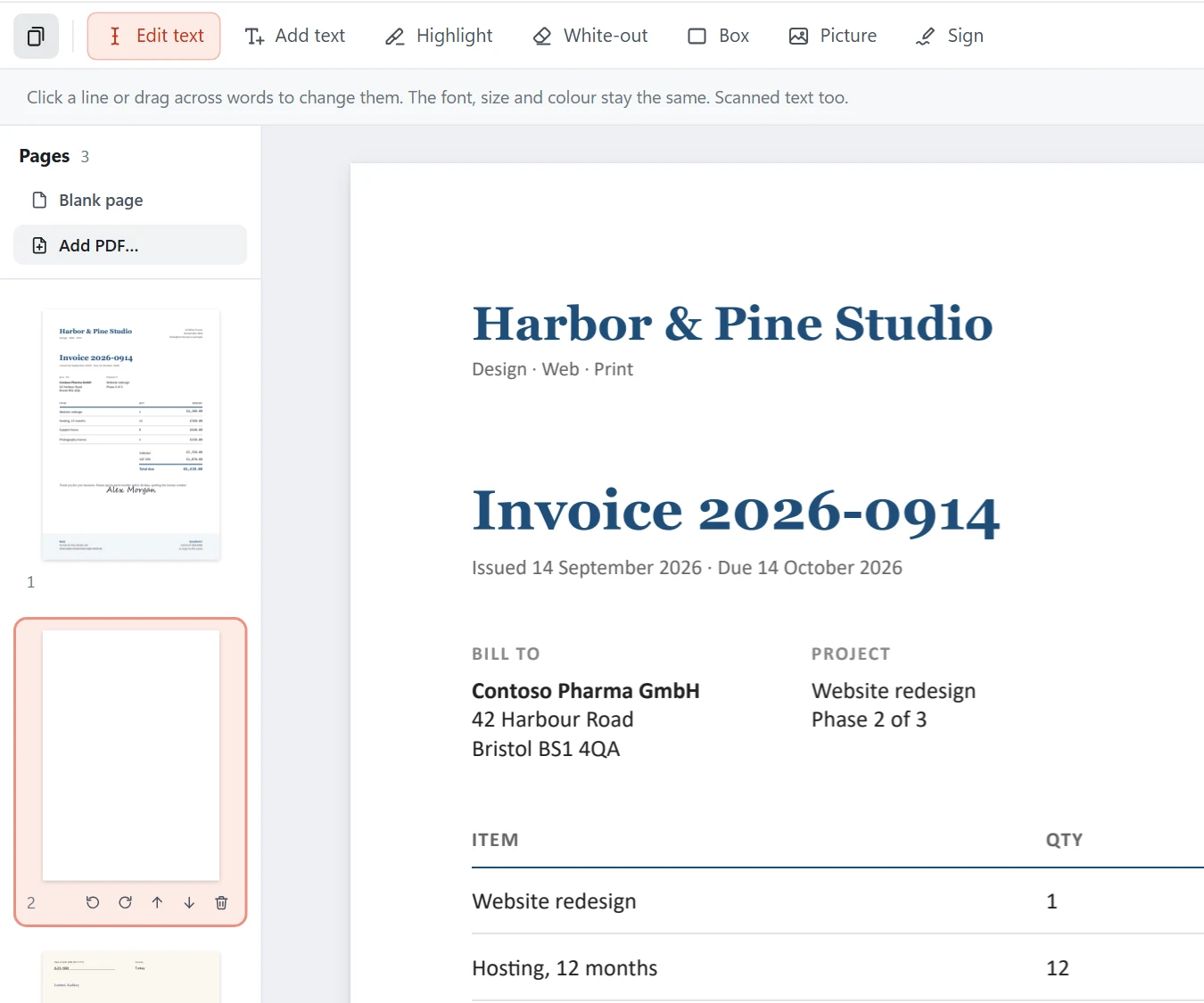
Fix a PDF in under a minute
Open the PDF
Drop it on the window or double-click it with Direct PDF Editor in Windows' "Open with" menu.
Click and type
Click the line to change, type the new words and press Enter. Add text, sign or highlight in the same way.
Save
Press Save. Your original stays as it was; the edited copy is saved beside it, or wherever you choose.
Why pay every month to fix a PDF?
| Direct PDF Editor | Subscription PDF editors | Free online PDF editors | |
|---|---|---|---|
| Price | $4.99 once | Monthly or yearly fees | Free with limits, or a subscription |
| Your files stay on your PC | Yes | Usually | Usually uploaded |
| Edits text in the same font | Yes | Varies | Often a different font |
| Edits scanned text | Yes, built in | Often in pricier plans | Rarely |
| Account required | No | Usually | Often |
| Works without internet | Yes | Partly | No |
One price. Yours for life.
Try every feature free. Unlock it once and keep it.
Direct PDF Editor
Launch price Goes up to $19.99 on 1 November 2026. 31 October 2026 left.
Plus local sales tax where it applies.
- Every tool: edit text, scans, sign, highlight, pages
- Free updates for life
- Email support for life
- Use it on up to 3 of your computers
- 30-day money-back guarantee
Secure checkout by Paddle with cards, PayPal and more. Your license key appears as soon as you pay, and arrives by email.
Free trial
Download it and try everything on your own PDFs. Trial saves carry a small line at the foot of each page. Enter your key and it is gone.
Download free trialWindows 10 & 11 · 64-bit · 7 MB
Questions, answered
Is Direct PDF Editor really offline?
Yes. Your PDFs are opened, edited and saved on your own computer and are never uploaded anywhere. The app only goes online to check your license key once when you activate it (and briefly now and then after that) and to see whether a new version is out. You can edit PDFs with no internet connection at all.
Does the edited text really keep the same font?
That is what the app is built for. When you change a line, the new words go back into the PDF as real text in the line's own font, size, colour and position. If the PDF only carries some of the letters of its font, the app uses the same font from Windows; if Windows does not have it either, it picks the closest one it has and tells you.
Can it edit scanned PDFs?
Yes. Text that is part of a picture (a scan, a photo of a form, a flattened PDF) is read with Windows' own built-in text recognition. Your new words are set over the old ones in the closest matching font, or, if you prefer, built from letters cut out of the page itself so they look like part of the scan.
What does "$4.99 lifetime" mean?
You pay $4.99 once. There is no subscription and nothing to renew: the version you buy keeps working forever, and every update we release is free for you. Support by email is included for as long as we make Direct PDF Editor.
What can I do in the free trial?
Everything. Every tool works in the trial. The only difference is that saved PDFs carry a small line at the foot of each page ("Edited with Direct PDF Editor (free trial)"). Unlock the app for $4.99 and it is gone from everything you save from then on.
Which computers does it run on?
Windows 10 and Windows 11 (64-bit). A Mac version is not available yet.
On how many computers can I use one license?
One key can be activated on up to 3 of your own computers. Moving to a new PC? Deactivate the key on the old one from the app's License window, then enter it on the new one.
Can it open password-protected PDFs?
Yes, if you know the password. The app asks for it, and the edited copy is saved without the password.
What if it does not work for me?
Write to us and we will help. If we cannot fix it, you get your money back: every purchase has a 30-day money-back guarantee.
Fix your PDF now. Pay $4.99 once.
Free to try. Nothing to sign up for. Nothing uploaded.