How to edit a scanned PDF (OCR built in, no retyping)
A signed form with a wrong date. A scanned letter with a misspelt name. The text is only pixels, yet you just want to fix one word. Here is how to do it on Windows, keeping the look of the scan.
What makes scanned PDFs different
A scanned PDF holds a photo of each page. There are no letters to click, only ink. Ordinary PDF editors can only paste a white box over it and ask you to type on top, which rarely matches.
Direct PDF Editor reads the words where you click with the text recognition built into Windows. It measures the letters' height, baseline, colour and the paper colour around them, and works out which installed font they are set in. Your correction is then set in that font and ink, on that paper colour.
Step by step
- Open the scanned PDF in Direct PDF Editor.
- Click the word or field you want to change with Edit text. For a phrase, drag a box around it. The app shows "Reading the text…" for a moment, then opens the editing box.
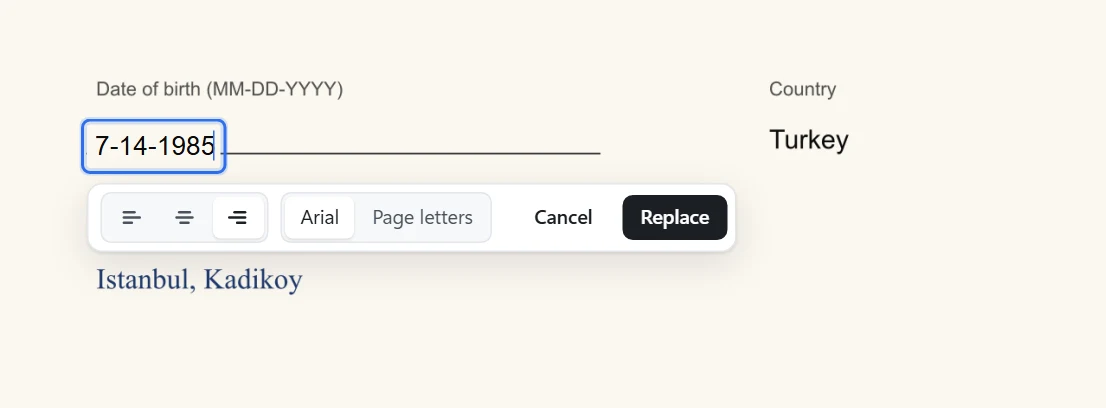
- Type the correction and choose how it should look:
- The matched font (for example Arial): sharp, real text that can be edited again.
- Page letters: your new words built from letters cut out of the scan itself, so they carry its grain and ink. Any letter the page does not have is drawn in the matched font.
- Press Enter, check the result, and save with Ctrl+S.
Tips for good results
- Zoom in (Ctrl++) on small print before you click.
- Drag a box around the exact words if a click picks up too much or too little.
- Straight scans work best. Text on a slant or on a busy background is harder to read.
- Keep the right edge for numbers in a column with the alignment buttons.
- If the scan has an invisible text layer (many scanners add one), the old layer is removed under your change, so searching the PDF finds your new words.
Questions
Is a scanned PDF editable?
Not directly: a scan is a picture of a page, with no text inside. Direct PDF Editor reads the words in the picture with Windows' built-in text recognition (OCR) the moment you click them, so you can correct them like normal text.
Does the scan get uploaded for text recognition?
No. Windows' own text recognition runs on your computer. Nothing is sent anywhere.
Which languages can it read?
The languages installed in Windows. To add one, open Settings › Time & language › Language & region and add the language; its text recognition comes with it.
Can I get all the text out of a scanned PDF?
Yes. Choose Menu › Save the text (.txt). Pages that are pictures are read by text recognition and their text is saved too.
Fix your scan in a minute
Everything runs on your PC. Free to try, $4.99 once to keep.